1. Register Your Account
After you enroll through the rebate portal, you will receive an email from Resource Innovations, the rebate vendor.
This email is your cue to finalize your Managed Charging account.
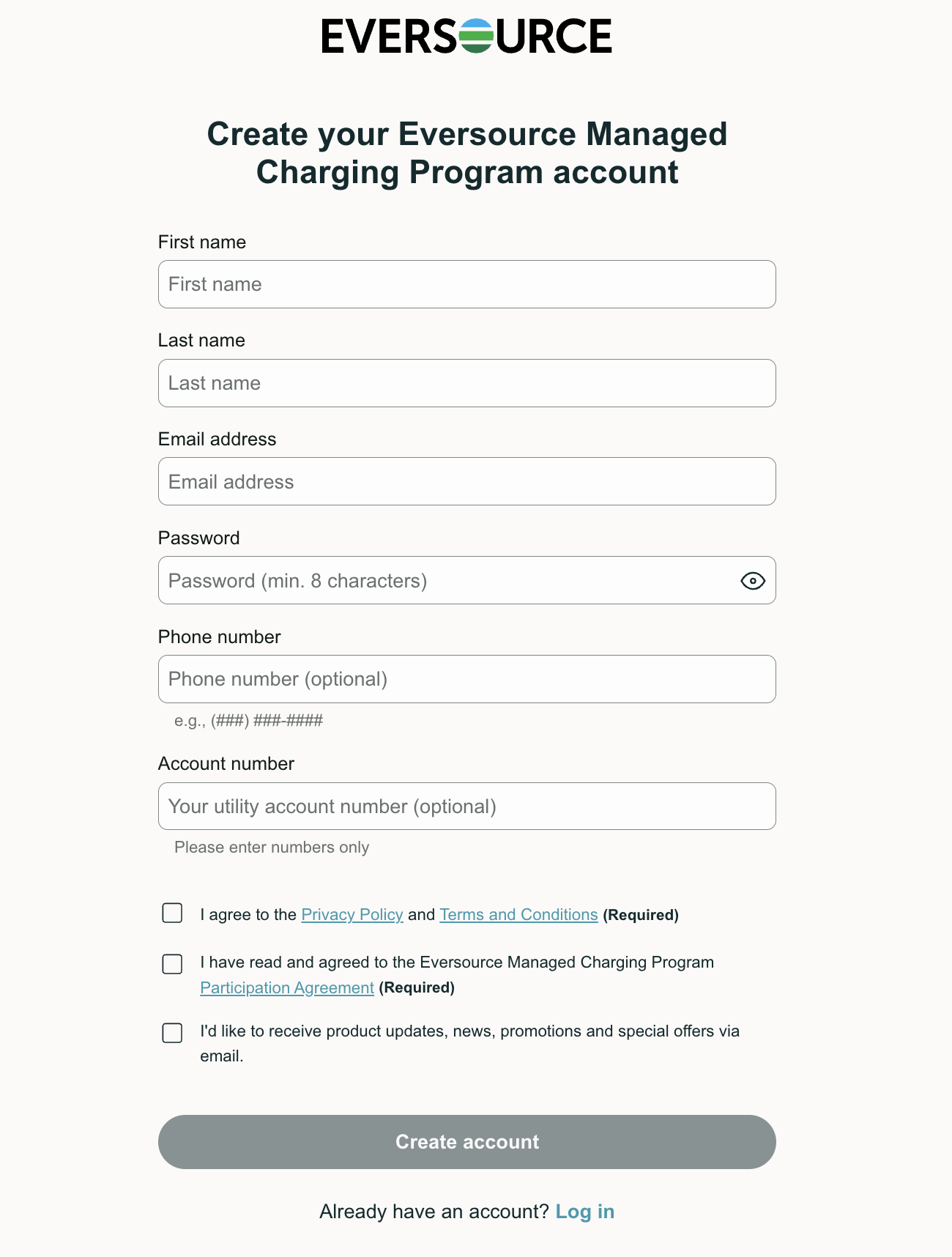
Inside the email, look for "Register Managed Charging Account".
Clicking this will allow you to create your official ev.energy credentials for the program.
The registration page will look like this:
2. Complete and Switch to Mobile
Select your address, onboard your device(s), and select a tier.
Enrollment is not complete until you select a participation tier and accept the terms and conditions.
3. Download the ev.energy App
Next, download the ev.energy mobile app. Think of the app as your "Data Hub"—it ensures your charging is tracked and sent to the rebate vendor so you get paid your monthly incentives at the end of the season.
Important: We strongly recommend downloading the mobile app regardless of your participation tier.
Since ev.energy acts as your primary data hub, the app is the only way to monitor your equipment status in real-time.
If your charging equipment becomes disconnected and goes unnoticed, it could result in incomplete data—leading to missed or reduced incentive payments at the end of the season.
Download the app here:
Was this article helpful?
That’s Great!
Thank you for your feedback
Sorry! We couldn't be helpful
Thank you for your feedback
Feedback sent
We appreciate your effort and will try to fix the article